A hotel booking calendar you understand at first glance

Every room on one screen: who is staying, who arrives, who leaves and what is still free. It is the planning board you use every day instead of a paper chart, and you pick it up straight away.

  • Choose how much to see: 15 days, a month, 3 months or a year
  • Today's column is always highlighted
  • The day's arrivals and departures in two boxes
  • 14-day free trial
  • No setup fee
  • Human support, no call centre
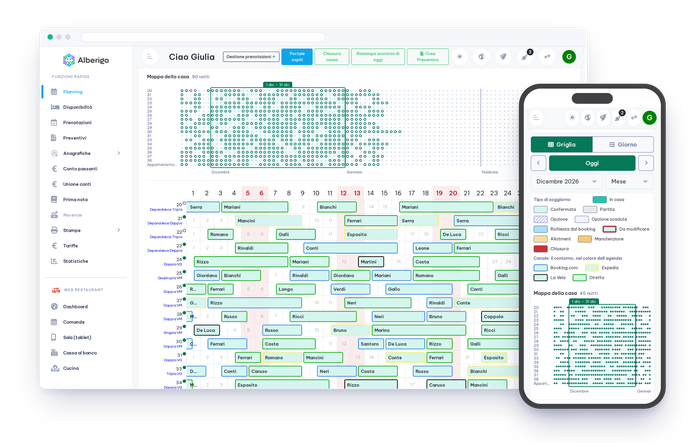
Alberigo booking calendar on desktop and smartphone: rooms, bookings coloured by channel and the house map

Add a booking in 15โ€“20 seconds

The phone rings and the guest is waiting for an answer. With the Alberigo planning board the booking is in while you are still on the call.

  1. Single and group bookings

    One room or a whole party: you enter them from the same planning board. Bills can be merged and split when needed.

  2. From quote to booking

    If the guest has not decided yet, you send a quote. When they confirm, the quote becomes a booking with nothing to retype.

  3. Closures and maintenance

    A room that needs fixing or a closed period is marked on the planning board, next to the bookings: you see it and so does everyone who works with you.

Alberigo room planning board with the Modern theme: patterns by type of stay and channel colours

A room calendar that reads itself

With the Modern theme every booking takes the colour of the channel it came from and a different pattern for each type of stay. The house map shows the situation unit by unit.

  • Channel colours and patterns by type of stay
  • Readable even when printed in black and white
  • House map, unit by unit
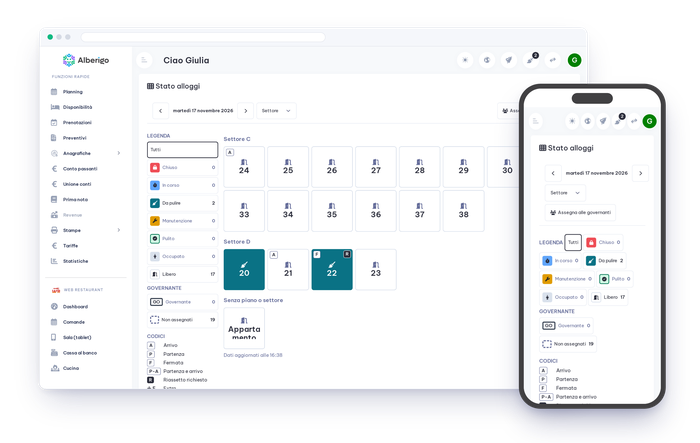
Room and cleaning status in Alberigo, on desktop and smartphone

Cleaning status right on the planning board

Whoever cleans the rooms updates the status from a tablet, and you see it on the planning board in real time. When a guest turns up early you know at once whether the room is ready.

  • Room status always up to date
  • Rooms assigned to each housekeeper
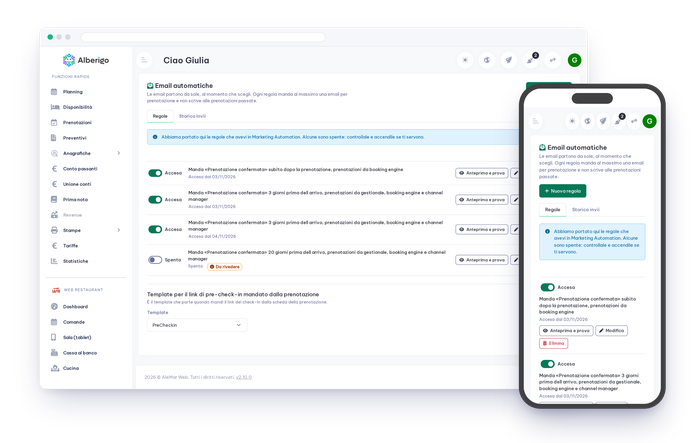
Automatic guest emails in Alberigo, on desktop and smartphone

After the booking, the guest email goes out by itself

You do not have to remember to write to every guest. You prepare the emails once and Alberigo sends them at the right moment, in the guest's language: at booking, before arrival, after departure.

  • Preview them before switching them on
  • The history shows what has been sent
Discover automatic emails

Your booking calendar on your phone too

You are not always at the front desk. On a phone the planning board has two views made for the small screen: Grid, to see the rooms over time, and Day, to know what is happening today.

  • Grid and Day views, designed for smartphones
  • Expected arrivals and departures, day by day
  • Cloud software: nothing to install
Alberigo booking calendar seen on a smartphone

You learn the planning board straight away, no courses or manuals

  1. We set it up together

    Rooms, prices and property details go in through a guided setup. Initial setup and training are included.

  2. Up and running in 15 minutes

    The planning board is the screen you use most, and it is made to be understood at once, even by people who have never used a property management system.

  3. A person answers you

    If you have a doubt you talk to someone on our team who knows the software and your property. No call centre, no queues.

Real Experiences

Why Hoteliers choose Alberigo PMS

Questions about the booking calendar

It is the chart that shows rooms in rows and days in columns: at a glance you see which rooms are taken, who arrives and who leaves. It is also called a planning board or tableau. In Alberigo it is the screen where you enter and change bookings.

With Alberigo a booking is entered in 15โ€“20 seconds, straight from the planning board. From your phone too.

Yes. On a smartphone the planning board has two dedicated views, Grid and Day. Alberigo is cloud software and there is nothing to install.

Yes. With the Modern theme bookings are told apart by patterns as well as colours, so the planning board stays readable even when printed in black and white.

Yes. Room and cleaning status is updated from a tablet and is visible on the planning board in real time.

Yes. From the planning board you enter single and group bookings, and you can merge or split the bills.

You choose between 15 days, a month, 3 months or a year. Today's column is highlighted and two boxes show the check-ins and check-outs expected for the day.

Yes, they come in by themselves. Portal bookings reach the calendar through the channel manager you already use (RoomCloud, SimpleBooking, DHynet and many others); bookings from your own website come in through the Alberigo booking engine. You copy nothing by hand. The connection status is always visible and you are warned if it drops.

Yes. The Plus and Pro plans include agency access, read-only or with the option to enter bookings.

All of them: Standard from โ‚ฌ39 per month, Plus from โ‚ฌ79 and Pro from โ‚ฌ129, VAT excluded. Virtual rooms are included in the Plus and Pro plans. The free trial lasts 14 days and needs no credit card.

Try the booking calendar with your own rooms, free for 14 days

No credit card and no setup fee. We set it up together and, whenever you need, you talk to a person.

Want to see how it works first? See what happens in the demo